Xero is great, but not always the best fit for solo businesses. In this guide, we review the top 5 Xero alternatives in 2025–built for freelancers, solopreneurs, and creatives who want simple, stress-free money management.


If you’re a solopreneur, freelancer, or creative running your own show, chances are you didn’t start your business dreaming of spreadsheets and reconciliation reports. But at some point, you realized: someone’s got to keep an eye on the money.
Xero is one of the most popular tools in the game, but it’s not the best fit for everyone.
TL;DR
Xero is a strong accounting platform, widely respected and packed with features. But for many solopreneurs, it’s too accounting-heavy, too time-consuming, and doesn’t provide the kind of clarity solo business owners actually need.
This guide explores the best alternatives to Xero in 2025: tools that prioritize simplicity, speed, and financial insight—so you can focus on running your business, not wrestling with software.
Why Xero Might Not Be Right for You
Xero is known for its clean design and solid accounting features. It’s often seen as the modern alternative to QuickBooks. But if you’re a solopreneur who values simplicity and clarity, here’s what you’ll want to keep in mind:
- Steeper learning curve than expected. While easier than QuickBooks, Xero still assumes you’re comfortable with accounting terms like “reconciliation” or “chart of accounts.” If you’re not, it can feel like homework.
- Time-consuming setup. Getting Xero running properly often means hours of manual setup—or hiring help.
- Invoice limits on lower plans. The “Early” plan only lets you send 20 invoices and enter 5 bills per month—frustrating if you want unlimited freedom as a solopreneur.
- Extra fees for payments. If your clients pay you through Xero’s integrated payments, transaction fees apply, eating into your margins.
- Cash flow forecasting is limited. You’ll need to rely on spreadsheets or extra add-ons if you want true forward-looking clarity.
- Features hidden in higher plans. Essentials like multi-currency or advanced project tracking require pricier upgrades.
- Support ecosystem varies. Xero adoption is growing in the U.S., but it’s still easier to find QuickBooks-savvy accountants locally.
Bottom line: Xero works for solopreneurs, but if you want fast setup, plain-language clarity, and fewer hours lost in accounting dashboards (without invoice caps or extra fees), there are alternatives that fit better.
5 Best Xero Alternatives in 2025
1. FreshBooks
FreshBooks is built for freelancers and service-based businesses that care most about invoicing and time tracking. It’s easy to use and makes client billing simple. But when it comes to full accounting, it quickly shows its limits.
Key Features:
- Time tracking
- Client portals
- Recurring invoices
- Project collaboration
Pros:
- User-friendly interface
- Great for time-based billing
- Solid mobile app
Cons:
- Entry-level plan only supports 5 clients
- Price jumps fast as your business grows
- Limited accounting beyond invoicing/expenses.
Best for: Early-stage freelancers who want polished invoices and time tracking.
2. QuickBooks Online
QuickBooks is the tool everyone recommends, especially your accountant. It’s robust, widely supported, and packed with features that make finance pros happy.
But for solo business owners? It can feel like too much. Between the learning curve, the dashboards, and all the configuration settings, it’s easy to get stuck tweaking instead of thriving. It’s a powerhouse, but not always the most intuitive.
Key Features:
- Payroll, inventory, mileage tracking
- Advanced reporting
- Accountant access
Pros:
- Deep feature set
- Popular among accountants and bookkeepers
- Tons of integrations
Cons:
- Steep learning curve
- Time-consuming to manage
- Overkill for simple businesses
- Higher cost
Best For: Businesses with accountants or complex needs, not lean solopreneurs.
3. Wave
Wave is where many solopreneurs start, and for good reason. It’s clean, functional, and free. If you just need to send invoices, scan receipts, and connect your bank account, it’s a great first step.
The challenge comes as your business grows. When every dollar counts, Wave helps you stay organized without costing a cent. But once things get more serious and you need true cash flow clarity (not just tidy spreadsheets), Wave quickly shows its limits.
Key Features:
- Invoicing and payments
- Receipt scanning
- Bank syncing
Pros:
- Free for basic use
- Easy to get started
- Good for side hustlers
Cons:
- Limited support for free users.
- Few integrations.
- Lacks advanced features like time tracking or forecasting.
Best for: New freelancers or side hustlers on a tight budget.
4. Zoho Books
Zoho Books is a good pick if you’re already using Zoho CRM or other apps—it ties into the ecosystem nicely. On its own, it offers solid accounting features at a fair price. But the learning curve can be steep, and support isn’t always as responsive as you might like.
Key Features:
- Multi-currency support
- Workflow automation
- Deep integration with other Zoho products
Pros:
- Affordable plans
- Recurring invoices and client portals
- Great if you’re in the Zoho ecosystem
Cons:
- Steep learning curve for beginners.
- Support can be slow.
Best for: Service businesses that want tight integration with their CRM and other tools.
5. Cashflowy
You didn’t start your business to become a bookkeeper. You just want answers like:
- How much do I have right now?
- Where’s my money going?
- Will I have enough for next month?
- Am I actually making money?
That’s where Cashflowy comes in. It’s built only for solopreneurs, creators, coaches, and consultants. Unlike Xero or QuickBooks, it doesn’t expect you to think like an accountant. Instead, it gives you instant clarity, without the setup headaches or jargon.
You might actually look forward to checking your finances.
Key Features:
- Visual cash flow dashboard
- Automated income & expense tracking
- AI-powered insights and reports
- Tax-ready reports
Pros:
- Designed for creators, coaches, consultants, and service providers
- Fast setup (15 minutes or less)
- Flat pricing with no upsells
- Built-in AI coach for smarter decisions
Cons:
- Not built for retail businesses with inventory
- No payroll features
Best for: Freelancers who want to get paid faster and manage all their finances in one place.
Why Cashflowy Wins Over Xero (For Solopreneurs)
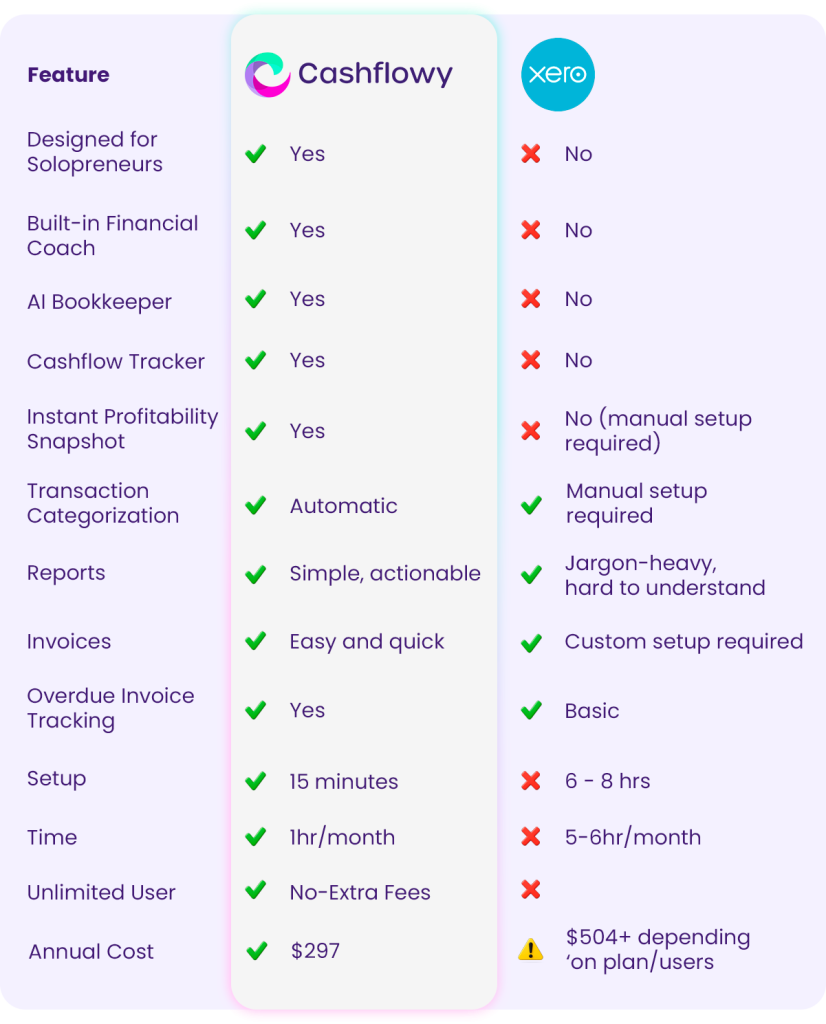
Cashflowy simplifies your entire financial life without sacrificing insight. You don’t need accounting software. You need clarity.
Your Next Step
You started your business to do meaningful work, not manage spreadsheets.
If you’re ready to ditch the financial overwhelm and finally feel confident about your money…
👉 Start your free trial of Cashflowy

FAQs About Cashflowy
Is Cashflowy an accounting app?
Not exactly, and that’s intentional. Cashflowy isn’t built to replace your accountant or bookkeeping software. Instead, it’s designed to give you crystal-clear insight into your cash flow: what’s coming in, what’s going out, and what’s ahead. No spreadsheets, no jargon, no accounting degree required. Think of it as your financial clarity tool, not your tax-prep tool.
Can I still use it with my accountant or bookkeeper?
Absolutely. Cashflowy makes their job easier and keeps you in the loop. You can export the numbers they need at tax time or month-end, while you stay focused on running your business day-to-day. It’s not “either/or”—it’s “better together.”
How fast is setup?
Super fast. You’ll be up and running in under 15 minutes. No endless onboarding, no training sessions, no manuals. Just connect your accounts, and Cashflowy starts working for you right away. You’ll spend less time figuring it out, and more time actually using it.
Is there a trial?
Yes! You can try Cashflowy free and experience the clarity it brings—often within the first login. See your money in a whole new light, make smarter decisions, and maybe even sleep a little better at night.
Do I need to be “good with numbers” to use it?
Not at all. Cashflowy is built for business owners, not accountants. It translates your finances into plain language and easy visuals so you can actually understand what’s happening with your money—without the math headaches.
What makes Cashflowy different from other finance tools?
Most tools focus on bookkeeping or reporting after the fact. Cashflowy is all about real-time clarity and forward-looking insight. Instead of just showing you what happened last month, it helps you see what’s coming next—so you can make decisions with confidence.
 The 5 Best Wave Alternatives in 2025 - Wave is a great free tool to start with, but it has limits as you grow. This guide covers the 5 best Wave alternatives in 2025–designed for freelancers, solopreneurs, and small business owners who want automation, clarity, and scalability.
 The 5 Best FreshBooks Alternatives in 2025 - f you’re a solopreneur, freelancer, or creative running your own show, chances are you didn’t start your business dreaming of spreadsheets and
 The 5 Best QuickBooks Alternatives in 2025 - QuickBooks is powerful, but too complex for many solopreneurs. This guide reviews the 5 best QuickBooks alternatives in 2025 that offer simpler, faster, and more affordable money management.